Thursday, October 12, 2017

Opening Multiple Assignments at Once

If you've ever tired of opening each student Google Classroom assignment one-by-one, you may be interested in the tips in this post! Alice Keeler offers some great shortcuts, as well as her Drive20 extension in which you can blast open 20 files at once in your Classroom Drive folder. ~Makes assessing & providing feedback much smoother.

Be sure to read the first post with those awesome shortcuts, such as Command W (on your Mac) to close a tab at a time and move to the next. Command, Shift T will reopen a closed tab too in case you go too far.

Knowing shortcuts will help save you precious time!

Take or Toss

Tuesday, October 10, 2017

Pear Deck Giveaway & Google Slides Updates

1. Just wanted to pass this Pear Deck post along. There is a chance to win premium access to Pear Deck for one year. You have to sign-up by tomorrow though. I signed up too, so if I "win", I'll pass it on to one of you to use with your kiddos. The post itself is also a great overview of how Pear Deck works with Slides.

2. Google Slides also has some awesome features being released tomorrow. An overview of what will be new :
  • Add-ons - Yessss! Looking forward to exploring these further.
  • Grid-View - see all your slides in one shot and rearrange them
  • Skip Slide -Instead of deleting a slide so it is not seen when presenting, you can now skip it to keep it in your original presentation.
  • Link Slides from multiple presentations
  • Insert Diagrams - Nice!!
  • Google Keep integration - if you or your students are not using Google Keep, you might want to check it out! Awesome note-taking, organizational and collaboration tool. Users will be able to pull content straight from their notes to their slide.

As always, give us a shout if you want to collaborate on any teaching & learning explorations.

Monday, October 2, 2017

Writing Project ~ Build a Jack-O-Lantern with Google Slides

Eric Curts has another great adventure for your students : Build a Jack-O-Lantern writing activity. This link goes straight to the slides to make a copy of.
  • Use with a descriptive writing lesson, a focus on adjectives, verbs, figurative language, etc.
  • Have students screenshot their pumpkins and share them with you to post on an online gallery to share your class "pumpkin patch".
  • Take it a step further and have students record their slide with Screencastify to bring their jack-o-lantern to life. QR code their video or use the Aurasma iPad app to link their jack-o-lantern to their video.
  • Invite another class to partner up with your students. Students walk their partners through a How-To create their jack-o-lantern. Each shares the original jack-o-lantern, along with the recreated one and reflect/discuss the process together.
Take or Toss!

If you're still reading, the background template is from SlidesCarnival. They have awesome Google Slides templates to use.

Wednesday, September 27, 2017

Split Screen Extension

Just wanted to share an extension that may come in handy for you. It's called "Alice Keeler Gradebook Split". Basically, it's a tool that will divide your chrome browser into two evenly split screens. This would come in handy to eliminate going back and forth from tab-to-tab. Instead, two tabs can be open simultaneously, side-by-side. It doesn't have to be a "gradebook" ~ Any tabs/sites will work, so the possibilities are endless. You can drag tabs from one side to the other as well.

Students can use Keeler's "Classroom Split" for Chrome in the same way. Rather than going back and forth between tabs, they can click the extension and have both tabs open. This would help with assignments in Google Classroom that they're often toggling between tabs with.

As always, Take or Toss! Let us know if you want to explore together.

Friday, September 1, 2017

Google Apps > Version History


In Google(Docs, Slides, Draw..), what used to be "Revision History" is now "Version History". Same concept of being able to see all progress on a document (additions, removals and contributions by all users); However, those versions can now be named. This could be implemented to show the writing process from rough/revised drafts to final, the steps of a process in Math or Science, for your own management of documents by reusing the same files without making multiple copies.....
Screen Shot 2017-09-01 at 9.14.19 AM.png
Here's a link, from Eric Curts at ControlAltAchieve, if you want to explore more about Version History.
As always, let us know if you'd like to meet to discuss and explore together.

Monday, August 21, 2017

FlipGrid Fever Ignite Discussion!

Ignite 🔥 Discussion

There is a FEVER out there in the education world and it is with FlipGrid! This can be used amongst staff and/or students. Many teachers are also getting parents on board at Back-to-school/ Open House events or within class projects too.
  • It integrates with Google Classroom and is simple to use : Pose a question and let responses fly!
  • Book studies, introductions, get-to-know-you, goals, wishes, dreams, fears, passions, explanations, debates, digital storytelling, demonstrations, reflections, connections with others outside of class and hold discussions (start with another class in the district, then state, country, world!) and sooo much more. Check out 15+Ways to Use FlipGrid in your Class & Another 15 here across the curriculum. Our very own Sue Lehner planted the seed to us about FlipGrid and has many awesome ideas for integrating it into classroom learning adventures as well!
  • Being on video can be an intimidating step for some students (and adults too). ~Visuals can be used instead. A student can use a still image to represent him/herself, a character, historian, concept/idea, etc. There are many options and the student still gets his/her voice heard... (You'll be surprised to see some students open up on camera though too).
  • Some teachers set up Recording Booths in their classrooms for FlipGrid to be used on chromebooks, laptops or iPads.
Let us know if you want to catch the FlipGrid Fever and explore together. Keep in mind this is just one tool in your bag-o-tricks to incorporate into teaching & learning. Use now and then to mix up your format for conversations, spark discussions and empower student voice.

As always, Take or Toss.

Friday, August 18, 2017

Google Classroom & Forms -What's New (updates)


I'm sure you may be aware of many of the updates to Google Classroom since many of you have been into your digital classrooms already this school year; However, just wanted to share this post that highlights some of the awesome updates (to forms too).

One great thing about Google is that they do listen to feedback. If you have a feature that you would like to see added, be sure to give your feedback. We've had a couple of PG peeps say they received an email that a feature they suggested was added. Awesome stuff!

Take or Toss

😊

Tuesday, August 1, 2017

Back-to-School 2017 Reminders

8/1/17
Hello Teachers!
Hope you are having an amazing summer with family and friends!
Archive/clean-up your Google Classrooms from last year if you haven't already done so. Let us know if you have any questions about this process.
  1. Many of you may be sending out family letters, which might be a good time to put a little blurb about any of your home-school connection apps/sites (sorry if I'm too late). Whatever platform you use, it often takes some time to get parents to sign up. Perhaps via your letter and then another sign-up at Meet-The-Teacher will help.
  2. Many of you may be sending out family letters, which might be a good time to put a little blurb about any of your home-school connection apps/sites (sorry if I'm too late). Whatever platform you use, it often takes some time to get parents to sign up. Perhaps via your letter and then another sign-up at Meet-The-Teacher will help


That's it!
Looking forward to seeing you soon. Start thinking about some of your goals regarding curriculum & technology ~ We'd love to meet with each one of you one-on-one or in teams to work towards achieving those goals.
Just a few thoughts to ponder :

  • Classroom Websites (spruce up or make less stagnant > more interactive with live docs, photos, slideshows of work, surveys, student-generated news, etc)
  • Going Google -Ready to explore moving from Libre/Pages to Google tools?
  • Students - explore learning adventures for your students to create, communicate and collaborate.
  • Going further with Google : Are you confident with Google apps and ready for more extensions and apps to rock your teaching and learning?! I'm in awe at what's available at our fingertips in the click of a button.
  • Organization/Note-taking : There are so many amazing apps & extensions to help streamline your daily routine and save you time! Google Keep (notes, lists, collaboration) is a great one for both teachers and students.
  • Interactive bulletin boards : Interactive learning stations, digital galleries, student book recommendations...
  • Knock down the walls! Connect your teaching and learning with others in another state, region, or country! Get your students collaborating on projects, blogging for an authentic audience….
  • Going "green" in the classroom? We can help! Digital tools to check for understanding, digital portfolios, student-created newsletters or teacher infographics instead of traditional newsletters, online galleries for families instead of work displayed on classroom bulletin boards....

Sunday, January 11, 2015

Sunny, With a High of Student Activity, Engagement, Participation, Communication......


I’ve come to a frightening conclusion that 
I am the decisive element in the classroom.
It’s my personal approach that creates the climate.
It’s my daily mood that makes the weather. 
As a teacher, I possess a tremendous power to make a child’s life miserable or joyous.
 I can be a tool of torture or an instrument of inspiration. 
I can humiliate or heal.
In all situations, it is my response that decides whether a crisis will be escalated or de-escalated 
and a child humanized or dehumanized.
-Haim Ginott


This has always been one of my favorite quotes. It hung on the classroom wall as a reminder to me during the ten years that I was in the classroom. I'm going to take its meaning on a bit of a different path today though....

Teachers are the decisive element in the classroom. Our Instructional Approach impacts the climate of the classroom as well. Like many of you, I am a reflective teacher. Beyond the specifics of the lesson, I would ask: Who's doing the majority of talking? The students or me? Majority of the Listening? Questioning? Them or me? Was I teacher-centered today, delivering content, or learning-centered, providing opportunities for students to investigate, solve problems, and acquire the knowledge? MI & Blooms were always at the heart and sole of learning, so I would reflect on those to determine if and how I was reaching all learners....

Time constraints, deadlines, looming paperwork, testing, and many of the other school initiatives often make reflection more difficult. I recall being caught up in it all and it felt easier for me to frequently deliver the content and fill their "vessels" with information.

Education is the kindling of a flame, not the filling of a vessel.
~Socrates

I also recall the climate in the classroom at that time ~ My instruction was creating downbursts of students who weren't as engaged,  a decrease in the ability of students to focus, and a drought of students who were not thinking critically about the concepts.

My purpose is not to contrast lecturing vs. student-centered groups. I've been completely captivated in some classrooms by the passion teachers bring forth in their lectures. I've also experienced where "group work" isn't effective too. The focus is on the power of reflecting on instruction.  Would I want to be a student in my own classroom? 

If you're looking to transform your instructional approach or switch up the weather within your classroom climate a bit, I have a few resources below you may be interested in checking out. Any of these can be used as or included in your own instructional presentations or for your students to get hands-on with! It's all about what works best for you and your students ~ We'd love to meet with you on any of these to help you plan your learning journeys. There are so many options as far as whole-class, small groupings, or individual implementations.

Have fun! 

We may just be surprised at the students whom sprout, grow, and blossom from the changes in our Instructional Climate.

-------------------------------------------------------------------------------

CHOOSE ONE tool or strategy from the list below to try with just one upcoming lesson. 
As you reflect on your experience, feel free to share any feedback below :)


  • I've already shared Plickers, Socrative, Kahoot, Oh My! as engaging ways for your students to interact with concepts, assess their knowledge, and give/receive feedback in real-time.
  • Lesson Paths - Check these out! Lesson Paths are like a "playlist" of your lesson. You can project the path whole-class or students can interact with each "step" in the path in small groups or on their own. The "steps" can include slides, websites, videos, and much more. You can even include interactive surveys or quizzes within your lesson path. 
  • Google Galore! - Our Google Apps are the perfect setting for us and students to create, collaborate, communicate, and share. Consider Google Forms, Sites, Draw, Slides, Spreadsheets, Documents, Google Hangouts, Google Classroom and a plethora of amazing applications & extensions that can be added on such as Lucidpress, PowToon and SO MUCH MORE! Again, I suggest you pick one from within here to focus on rather than trying to tackle Everything Google all at once. 
  • Smore - This is a simple, digital "flyer" that offers a nice alternative to your typical presentation. Links, videos, text, and images can all still be integrated to share content or for students to use to guide them as they embark on their learning adventure! 
  • BackChannels : We've shared both of these before, but consider Today'sMeet & Padlet to empower student voice and encourage participation - You could even keep your lessons just as they are, except, provide students with an opportunity to communicate and collaborate digitally during the face-to-face lesson. 
  • FlipGrid - Catch the FlipGrid fever and let your students' voices be heard with this video response platform.
  • Connect, Connect, Connect! I'm said it in many posts...knock down the walls of your classroom and empower your students' voices. Give them an authentic audience!
  • Variety of instructional strategies for the classroom. Many of these were my favorites~ others are ones I haven't tried yet. :)
-----------------------------------

Thank you for all that you do for our students! 

I'd love to hear your reflections....


Monday, November 17, 2014

Make a Book.....Talk?

Many students love sharing the reading adventures that they've embarked on. Often, we ask students to write a book review or videotape a book talk. Why not take it one step further and make your classroom library interactive using the student book recommendations?

Book covers or the books themselves can be linked to a QR code or the Aurasma app. When students hold their iPad up to a book, or a copy of the book cover, the recorded video book talk will come to life. Students can listen to the book review and determine whether that book will be their next reading adventure. You can use your current classroom library, a bulletin board or other designated space, create your own  "ReadBox" area, or dedicate a section of your classroom site to book recommendations!

Students will love to hear the recommendations from their peers. What a great way to empower students ~ rather than writing a book review solely for you or as a class requirement, they now have an authentic audience to share with. Their purpose changes and often, so will their engagement.

Check out the examples below produced by a few students in Mrs. DeVries' 3rd Grade class. Students used Chatterpix and Tellagami to share their reading adventures; However, a basic video can be used to record the book talk as well.


Plickers, Kahoot, Socrative, Oh My!


Look no further for some awesome student response systems to use in your classrooms.  With each of these, students receive immediate feedback and data is available in real-time. No waiting to grade, count up or tally results. Use for anything from an informal poll, a review activity, to a formal assessment.


1. Plickers : Paper Clickers! Students do not need devices for this response system. Only one device is needed and will be used by the teacher to hold up and scan the class responses. Students will receive a unique paper code labeled A-D that they will hold up to share their response to a survey, exit ticket, poll, pre-assessment, review question, and so on. Teachers scan the class which the Plickers app while students hold up their response. Teachers get real-time results and data is automatically saved. Check out Plickers to download the codes and sign up for free.


2. Kahoot : Is a total hoot and your kids will LOVE it! This is a fun one to use to really engage students in a game-like fashion with the learning. Awesome for reviewing, assessing prior knowledge, or any form of checking for understanding. Students can work individually or in teams. Each individual or team will need a device ~ laptop, computer, iPad, or iPod Touch. The teacher will create the game by entering the questions at the Kahoot site. Students will navigate to kahoot.it to enter their game code (We have Kahoot linked on the community iPad Cart as a web app too). When prompted, students can enter their name, a nickname or a team name. Teachers project Kahoot on the board and begin! Enjoy!! :)


3. Socrative : Another awesome opportunity for your students to respond, receive immediate feedback and teachers see results real-time! Teachers sign up at the Socrative site for free and get a class "room" code. Create quizzes, tests, exit tickets, surveys, "space race" games and more. You can even use already-created quizzes that teachers have made available in the Socrative Garden. Download the share code to use or modify to fit your purpose.

Students will use any device to access Socrative and log in to your room. Our iPads already have the Socrative app, but laptops or computers can be used as well. Any device with Internet access will work!
Results save to Socrative and can be revisited at any time. Individual student reports can be made available to students as well.


----------------------------------------------------------------------------------------------------

This was just a brief overview of these three student responses systems available to you and your students.  Let us know if you'd like to get together to explore any of them further. As always, we'd love to work with you and your students to implement these in your teaching and learning adventures.


Thursday, October 30, 2014

Extra! Extra! Communicating Classroom Happenings

Want to switch up your classroom newsletter? I've heard more and more comments from teachers jokingly questioning if parents even read their newsletters or online updates. You all work so hard to communicate classroom happenings, updates, and reminders ~ your newsletters and site updates are awesome! If you have any doubts, why not give them a reason to tune in that they can't resist?! Whether you want to make your class news more interactive for families or transform it completely, there's an idea here for you. Be sure to share your own for your fellow teachin peeps as well.

Student Voice! Empower your students by putting them in control of communicating the incredible learning adventures taking place in your classroom or grade. Think about all of the skills and strategies that can be developed and strengthened by student-led news. Students will be so motivated to share with an authentic audience outside of the four walls of their classroom. Families will be excited to tune in to see what the student leaders have to share!

Consider:

Student-Led Newsletter ~ Have your students create and share the news! Students can collaborate on a shared GoogleDoc to communicate classrooms happenings via pics and text. Students can go off of a basic template or switch up the format as they see fit. The doc can be uploaded to your class website or blog to share with families.

Student-Produced Video Newsletter ~ Put your students in charge of celebrating classroom learning adventures by creating a newscast. Rotate roles through your weekly job assignments or set up a special schedule just for the newscasting. Students can upload the videos to a shared folder in Drive and can be embedded right on your site or blog.

Options for sharing the above news (aside from embedding on your site/blog):

  • Attach a QR code to their take-home folder or assignment notebook that links to your class website. Families can scan the code to access your site quickly from their mobile device.
  • Blast a message via REMIND with a digital copy of the news attached.
  • Add a QR Code to a corner of your paper newsletter. The code can link to the student-created video or collaborative doc.

Classroom Twitter Account: You can make a private or public classroom account for families to connect with. Students can take turns sharing classroom updates. You can even add images or attach links to files, videos, student creations, and more! What an awesome, real-time way to keep families informed. Not to mention how this opens the door to really knock down the walls of the classroom and connect with experts or other classes...check out the bottom of this post for more info :) One class tweeted a question to NASA - NASA responded quickly with an amazing visual tweet. Another class ended up getting a NASA visit via a video-call too. Let's make these opportunities available at our students' fingertips too!!


Not ready for that transformation just yet? Bring your current newsletter to life:
  • QR Code : Add a QR Code to a corner or portion(s) of your newsletter. The code can link to a picture, online website, video, study guide, spelling list, weekly vocabulary, an answer to a question, a Google Form/Survey/Permission Slip, class digital story, student book trailers, an audio file and more!
  • Add a link to a brief, pre-recorded video of a talking avatar such as Voki, Tellagami, or Chatterpix. Utilize these to share special events on your own OR spotlight a student sharing a concept, must-read book, or highlights of the week.
  • Take your hard copy to the digital world. Either post it online at your class site OR consider blogging about classroom adventures and events. Print hard copies for families that request them.


Instead of telling families about the class activities, consider saying less and include essential questions or "just enough" to provide opportunities for conversations at home about classroom learning adventures. Many times, parents don't know what to ask kids about what's going on in the classroom. Adjusting your newsletters or class updates can offer an awesome opportunity to involve parents while also strengthening your students' voice.

SCIENCE example: Rather than telling parents about our buoyancy activities in Science this week, I might say: Ship Shape / Sink or Float? Be sure to ask your young scientist about his/her aluminum boats. How were the sinking and floating boats different? Based on what they know, have your student hypothesize and test out objects at home. Encourage your child share your family findings on our class blog! 

MATH example: Instead of sharing about the geometry concepts we developed and strengthened in class this week, I might spark a conversation with: Our Mathemeticians have been busy exploring Geometry in our world. Ask your child what examples his/her group discovered on our school hunt this week. Be sure to check out our collaborative book that displays our Geometry Graffiti around our school. Your child is invited to add on to our book to include pics of Geometry from around the house.   


Just a few ideas to enhance your home-school communication and empower student voice! Hope something here sparked an idea that started dancing in your brain ~ I'd love to hear about it. Share your thoughts below or give us a shout if ya want to collaborate on some ideas together.

As always, Take, Tweak, or Toss!


Thursday, October 2, 2014

Fall Fun!

Just a "few" ideas to sprinkle throughout your learning adventures (I can't help that it's more than a few. My brain is dancing with ideas for you and your kiddos! Let's meet to talk more because I'm holding back on here). :)  Hopefully you'll find something new your students may want to explore OR you can take anything you're already doing (your construction paper spiders, leaves, pumpkins, etc) and enhance it with your students' digital creations.

You (OR your students!) dream it ~ We will help you make it happen!

1. Bring Learning to Life! Think: your spiders, pumpkins, leaves, haunted houses, ghosts, and anything across the curriculum! Students can take a picture of their writing and/or construction paper creation (or make a digital one) and make the still image come to life. The "characters" can : read aloud a poem, discuss its characteristics, share adjectives to describe itself, retell a story from its point of view, interact with the viewer and ask questions to engage him/her on a quest, and so much more. These can make your bulletin boards and displays interactive too!


Other ideas:
Synonym Spiders
The Web of Writing
Pumpkin Patch Personalities
Ghastly Ghosts 
Spooky Sentences
Monster Math
Haunted ReadBox (link to student-created video reviews of spooky stories)
Boo-tiful Books
Scare Up _____.....(a good book, spooky writing, fall fun.....)
Trick or Treat, ____ is Neat (geometry, reading, writing, astronomy....)
Haunted House for Sale (Persuasive Writing)
Brewing Up _____ (Magnificent Math, Spectacular Spelling, Incredible Idioms)
Howling Hypotheses (science)
Fang-tastic Figurative Language
Ve Vant to Share our Batty Vriting Vith You


Bring these to life with:


Camera app
 (use a QR Code or Aurasma on image)


Transform these into Digital StoryTelling:

Engage your students and empower their voice by providing opportunities for them to create and publish their work for a larger audience! Most importantly, give students options ~ let them choose how they want to produce their writing:
    • MyStoryBook (app) Students create a book with options for text, audio, images and drawings.
    • StoryBird (website / use computers)
    • 30 Hands - (app) Produce an audio tale
    • Chatterpix - (app) Fall Poem or Pumpkin Poem (short, 30 second voice recording)
    • BuildYourselfWild (website) Creative writing opportunity to go with their "Wild Self".
    • Use any of the above options for students to collaborate on a story together.
    • GoogleApps - Students can collaborate on a shared Document or presentation
    • Share their creations on a blog for a larger audience.
    • many more ways..........


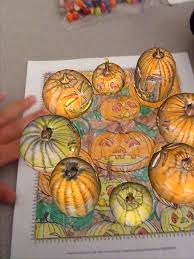
2. Pumpkin Patch Tales : A fun twist to engage your students in writing. Students color the pumpkin-theme sheet from colAR (AR stands for Augmented Reality) and write a story to go along with it. Put their tales on display in the classroom or low-bulletin board. Students can read one another's' tales and, with the colAR app open, watch the pumpkins come to life and dance around the "paper" along to music. Check out CoolKatTeacher's awesome post with resources and more information about Augmented Reality!


3. Interactive Bulletin Boards: This is where QR Codes and Augmented Reality can really come into play. You don't have to have a "bulletin board" either. A spot in the room, a tub, a sheet of paper, or any object in the room can house the interactive activity.

  • Halloween / Fall Stories Listening Center 
  • Scavenger Hunt 
  • Math POD or other station on any concept (make it a Math Monsters theme for the season)
  • Fall Fact Word of the Week/Day : Students scan a QR Code of the word and use the iPad to discover and share facts about the word.
  • Any bulletin boards, student display, or activity shared throughout this post (or already in your room) can become "interactive" and enhance student learning.

4. Responding to Reading
  • Spookley the Square Pumpkin - After reading the story, use Camera on iPad to take pictures around the building of shapes (groups can be responsible for a specific shape) and create a digital story.
  • Room on the Broom  OR any story:  Use 30 Hands or MyStory to create an illustrated retelling, sequencing, or summary of the story.
  • Switch up you Literacy Menu for the month and incorporate Fall/Halloween apptivities.


Take, Tweak, or Toss anything! 

Don't forget the countless ways your integrationists can work with you to support and enhance your teaching and learning adventures:


Tuesday, September 30, 2014

Literacy Menu Apptivities


Just wanted to share a resource for your students to use during Literacy stations for exploring, creating, reflecting, and sharing their knowledge. 

Each of the three samples below are view-only, so go to File > Make a Copy in order to edit for your own use. We'd be happy to work with you to create one specific to your classroom wants/needs. :)

As always ~ Take, Tweak, or Toss!


----------------------------------------------------

Detailed (for teaching/modeling purposes) and includes extra options. Links are also included to samples or printable activities.  


---------------------------------------------------------------------------------------


Sample of how you might reduce to 3-4 options for students.


 ------------------------------------------------------------------------


If those are still too detailed, you can super simplify into something like this WordWork sample:


-----------------------------------------------------------------------


HAVE FUN!